

Chapter 2 - Getting Started with Canva
THE LANDING PAGE
Once you are logged in, you'll be greeted by a user-friendly workspace consisting of a toolbar, canvas area, and a sidebar.
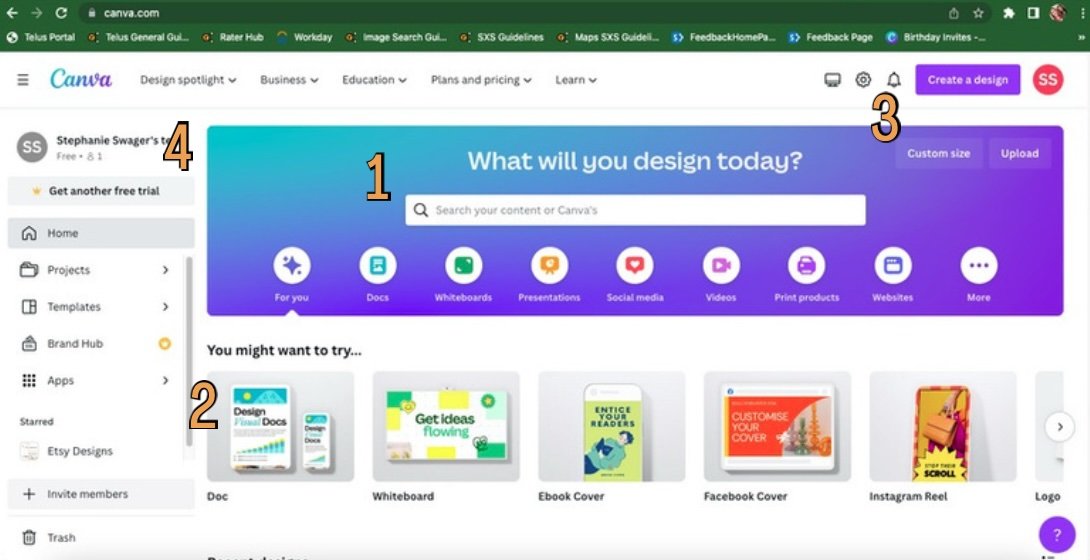
The tool bar is the easiest way to search for different templates! This is also where you can easily search projects you have already created.
Below you will see the canvas area. This is where there are categories of templates laid out for easy access. Once you have begun creating your own projects, you will also see your most recent work below.
The custom size button makes it a breeze to create a design that is the exact specifications you are needing. Whether is a simple letter size or a big poster, just enter the dimensions and it will create a blank document ready for you! There are also pre-determined sizes available.
To the left you will see the side bar. You can access your designs, templates, pro-account if you join, and any "folders" you create. These folders are a great way to keep your designs organized by category. If the side bar feels overwhelming or distracting, simply hit the three lines in the top left corner to minimize it!
-
Personal Instagram Page: @caitlinaarmstrong
Personal TikTok Page: @caitlinaarmstrong_
The Social Voice Instagram: @socialvoice.co
Website: https://www.thesocialvoiceco.com