

Chapter 3 - Canva Workspace Essentials
THE PROJECT WORKSPACE
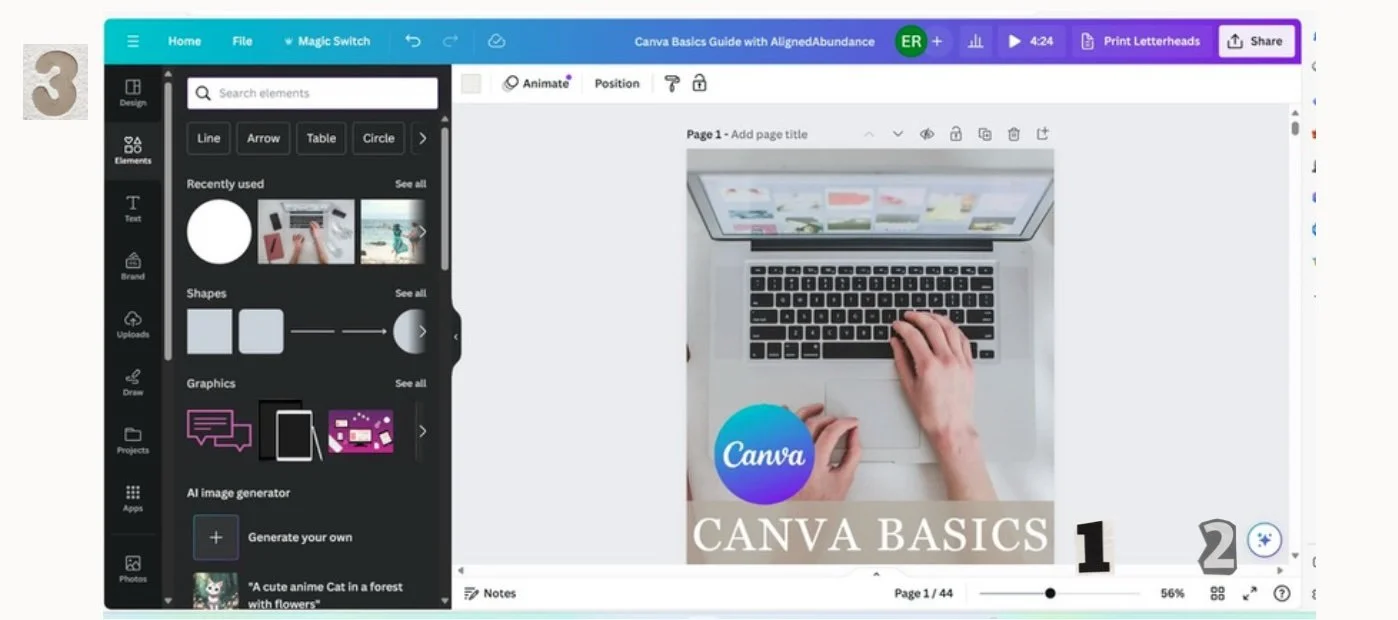
Zoom- This slider at the bottom right of the screen will help you simply zoom in and out. This will ensure that you get a close up view of your design as well as a full page to see your overall design. There is also a slider right above that allows you to slide the page left to right.
Grid View- The small arrow in the bottom center or four square icon in the bottom right allows you to navigate multipage designs quickly. Simply click the icon then select the page you want to work on and it will take you straight there! And if you are wanting to see your design full screen, the double arrow icon to the right will do so.
Side Bar- This side bar is possibly the most essential tool in Canva. It is where you add elements, text, backgrounds, and even upload images of your own. By clicking the icon of the action you wish to perform, it will take you to that category. In each section you are able to easily search Canva's library! To minimize the side bar to better see your design, simply click the small arrow on the right. Then click the side bar to open it back up again.
-
Personal Instagram Page: @caitlinaarmstrong
Personal TikTok Page: @caitlinaarmstrong_
The Social Voice Instagram: @socialvoice.co
Website: https://www.thesocialvoiceco.com